Dictto
Speak your thoughts. All of them.
Other dictation apps give you 30 seconds.
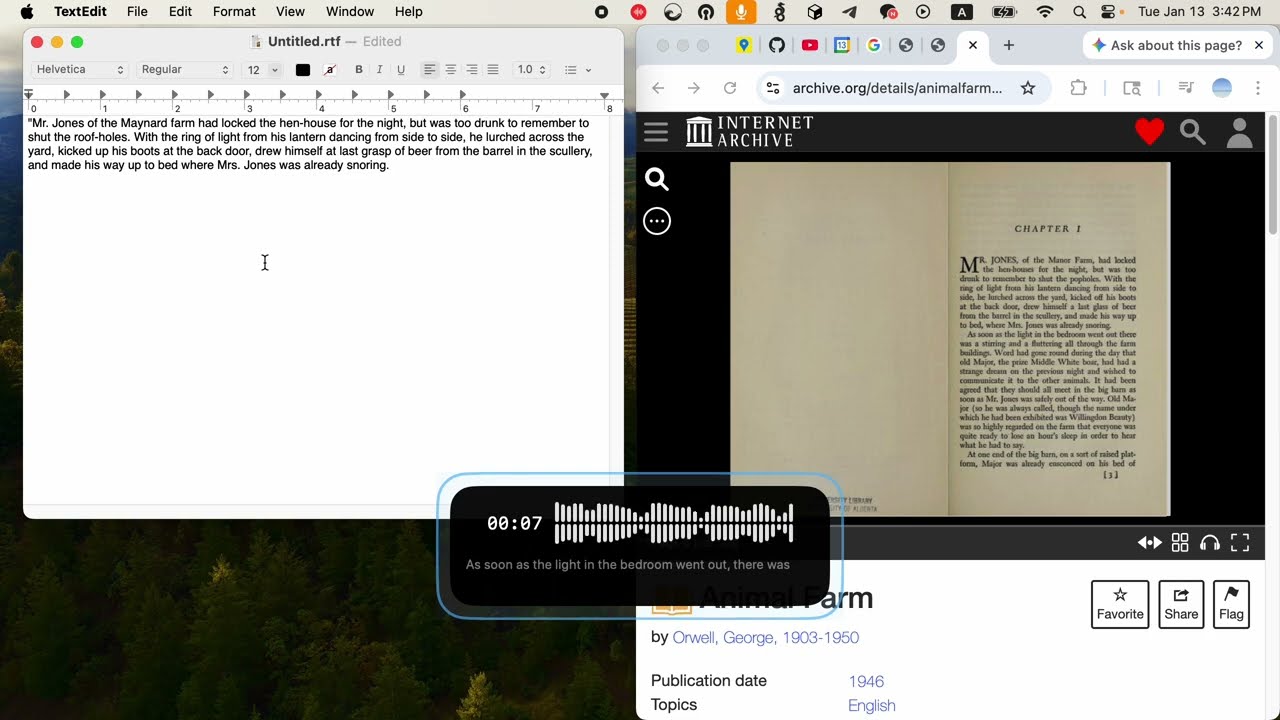
Dictto lets you speak for 5 minutes or 50 — text streams as you talk,
ready the moment you stop. Nothing ever leaves your Mac.
Everything you need
Professional-grade transcription that respects your privacy
Long-form Dictation
Speak for 5 minutes or an hour. Text streams as you talk — your transcript is ready the moment you stop.
100% Local
Everything runs on your Mac. Your voice never touches the cloud. Complete privacy, even offline.
Voice Agent Mode NEW
Press ⇧⌥S to talk directly to Claude Code. Multi-turn voice conversations — ask questions, get answers, continue the dialogue.
Claude Code Integration
Connect Claude Code via dictto-mcp. Transcribe files, manage dictionaries, and check status — all from your terminal.
Custom Dictionaries
Add names, companies, and domain terms so Whisper gets them right. Build dictionaries by just telling your LLM.
Powered by Whisper
OpenAI's state-of-the-art speech recognition, running locally via whisper.cpp on Apple Silicon.
Global Hotkeys
⇧⌥D for dictation, ⇧⌥S for voice agent. Text auto-pastes into your cursor when you're done.
Multilingual
English, Korean, Japanese, Chinese, and 90+ languages.
SRT Subtitle Export
Export file transcriptions as SRT subtitles with accurate timestamps. Ready for video editing.
Audio Capture
Capture and transcribe audio from any app — Chrome, Safari, Zoom, and more. Live subtitles with SRT export.
Talk to Claude Code
Press ⇧⌥S and speak. Your voice becomes Claude's prompt.
Perfect for
Built for professionals who value speed and privacy
Developers
Talk to Claude Code hands-free. Voice agent mode for coding, reviewing, and navigating your codebase.
Writers
Draft faster. Think out loud, edit later.
Privacy-conscious
Lawyers, healthcare, anyone handling sensitive information.
RSI / Accessibility
Reduce typing strain without sacrificing speed.
Voice Memo Users
Share recordings directly for instant transcription.
Meeting Notes
Transcribe meetings and export as SRT subtitles with timestamps.
System requirements
Start speaking.
Free Community edition. No account required.
Download for Mac